
Starting an online store on a shoestring is hard enough without the added cost of professional photography. Lighting setups, photographers, studio rentals — it all adds up before you've sold a single item. And yet, the first thing a shopper judges is the image. That's exactly the gap that Nano Banana AI — an image generation model on the Kimg AI platform — was built to fill.
I. What You Can Actually Create (And It's More Than You'd Expect)
Forget blurry phone photos against a wrinkled bedsheet background. With Kimg AI, you can generate product visuals that look like they came out of a proper studio.
- Clean product mockups from a simple photo Upload a reference image of your product, write a short description of the setting you want, and the AI handles the rest — white backgrounds, lifestyle scenes, flat lays, you name it.
- Multiple styles without reshooting One product, a dozen visual angles. You can generate the same item styled for different audiences — minimalist for one ad set, warm and cozy for another — without touching a camera.
- Consistent brand look across listings Whether you're selling on Shopify, Etsy, or a local marketplace, consistent visuals build trust. Kimg AI lets you define a visual style and replicate it across your entire catalog.
II. The Models Behind the Magic
Kimg AI isn't a single-trick tool. It brings together a suite of AI models under one roof, each designed for different creative needs.
1. Nano Banana — Your Everyday Workhorse
Nano Banana is the core image generation model on Kimg AI. It handles text-to-image generation and style transfer with impressive photorealism. You can upload up to 4 reference images to guide the output, which is perfect when you need the AI to understand your product's shape, color, and texture before generating anything.
It supports style transfer too — photorealistic, illustrative, anime-inspired — so you're not locked into one aesthetic.
2. Nano Banana Pro — When You Need That Extra Edge
The Pro version is designed for sellers who need polished, high-detail assets. It supports higher resolution outputs (2K and 4K for members) and handles complex prompts with sharper accuracy. For store owners preparing images for large banners, paid ads, or print materials, this is worth knowing about.
3. Seedream, Flux, and More
Kimg AI also gives you access to Seedream — which generates images fast, great for bulk concept testing — and Flux, which excels at context-aware editing. You can swap text within an image, adjust a specific object, or clean up backgrounds without disturbing the rest of the composition.
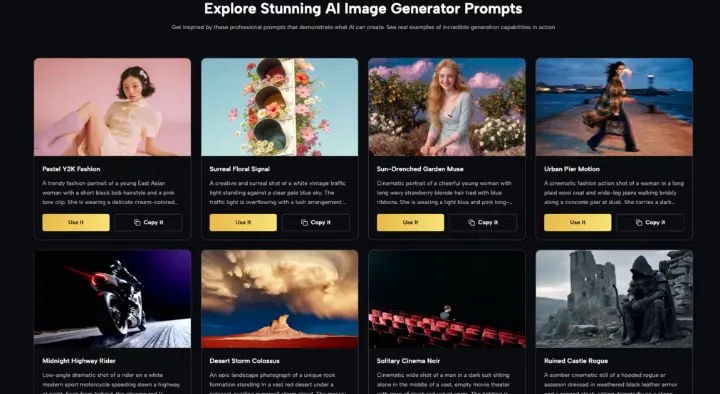
Having Seedream, Flux, GPT Image 2, Grok Imagine, and Nano Banana all on one platform means you can test different models for the same product and immediately compare results. No juggling between five different websites.
III. From Still Image to Short Video — In the Same Workflow
Here's something most sellers haven't thought about yet: turning a product image into a short video clip for TikTok or Instagram Reels.
- Generate your image first Use any of Kimg AI's image models to create your product visual.
- Animate it with Veo 3 Kimg AI integrates Google's Veo 3, a video generation model that takes your static image and adds natural motion — and even synchronized audio. A floating perfume bottle, a rotating sneaker, steam rising from a mug. Small touches that stop thumbs from scrolling.
- Use your free credits The best part? You can do this with the credits you already earned for free. No separate subscription for video.
IV. The Free Credit System — What You Actually Get
Kimg AI has one of the more generous free tiers around, and it's worth understanding before you dismiss it.
- Sign up and get 400 credits instantly New accounts receive a 400-credit Sign-up Bonus the moment you register. No credit card needed to start.
- Check in daily for a week, earn 440 more credits Logging in for 7 consecutive days earns you an additional 440 credits. That puts your starting total at 840 credits.
- Over 200 free images right out of the gate With 840 credits, you can generate well over 200 images using Kimg AI's premium models — enough to build out a full product catalog for a new store without spending anything.
- 440 credits every week after that The weekly check-in bonus doesn't stop. Keep logging in consistently and you'll be generating around 110 images per week for free, every single week.
V. Who This Is Really For
You don't need to be a designer, a marketer, or a tech person to use Kimg AI effectively.
- New sellers with no photography budget If you're pre-revenue and trying to look professional, AI-generated images are the most practical shortcut available right now.
- Dropshippers who need original images Using the manufacturer's stock photo is the fastest way to blend in. Generating custom visuals — same product, entirely different setting — makes your listing stand out.
- Small brands testing new product lines Before you invest in a photoshoot, run a few AI-generated mockups by your audience. It's faster, cheaper, and often just as effective for early-stage testing.
- Content creators building a store on the side If you're already comfortable with AI tools, Kimg AI will feel intuitive. The multi-model interface is clean, switching between Nano Banana, Seedream, or Flux takes seconds, and the credit system gives you real room to experiment.
Conclusion
The biggest visual disadvantage new sellers face isn't talent — it's access. Professional product photography has always required either money or connections. Kimg AI changes that equation. You don't need a studio. You don't need a camera. You don't even need to spend anything to get started.
But more than the free credits or the model variety, what matters is this: the gap between "I have a product" and "I have a store that looks credible" just got a lot smaller. The tools are already there. The question is whether you'll use them before your competitor does.
Register at Kimg AI, claim your 400 credits, and see what your products could look like with a little AI help.
How New Sellers Get Professional Product Images Without a Camera