
The shift from experimental AI prompt-engineering to a structured production workflow is the primary challenge facing creative teams today. Most content departments have moved past the initial novelty of generative media; the focus has now shifted toward how these tools can fit into a repeatable, high-stakes delivery pipeline. When a marketing team needs to produce forty variations of a social ad, "magic" is less important than reliability. The core of this transition lies in how an AI Video Generator is integrated into the existing creative stack, moving from a siloed curiosity to a fundamental asset generator.
Operationalizing generative video requires more than just a subscription to a new tool. it demands a change in how we think about "shooting" and "editing." In a traditional environment, the camera captures reality, and the editor shapes it. In a generative environment, the operator defines a latent space, and the model synthesizes it. This shift creates a massive consistency problem that most teams are currently trying to solve with varied success.
The Consistency Dilemma in Generative Workflows
The most significant barrier to using an AI Video Generator at a professional level is temporal and aesthetic consistency. If character A looks slightly different in shot two than they did in shot one, the narrative breaks. This is where many content teams fail—they treat generative tools as a slot machine rather than a precision instrument.
To solve this, teams are beginning to build "visual anchors." This involves generating static reference frames using an AI image generator before ever touching video. By locking in the lighting, color grading, and character proportions in a still image, the subsequent video generation has a foundational seed to follow. However, even with these anchors, we must acknowledge a current limitation: generative video still struggles with complex, multi-step physical interactions. If a script requires a character to tie a specific knot or perform a highly technical manual task, current models often hallucinate the physics. In these instances, human-led compositing or traditional B-roll remains the more reliable choice.
Integrating Multi-Model Ecosystems
The "one model to rule them all" era has not arrived. Instead, we are seeing a fragmentation where specific models excel at different tasks. One model might be superior for cinematic lighting and slow-motion textures, while another—perhaps a more lightweight version like Nano Banana—is better for rapid prototyping of motion graphics.
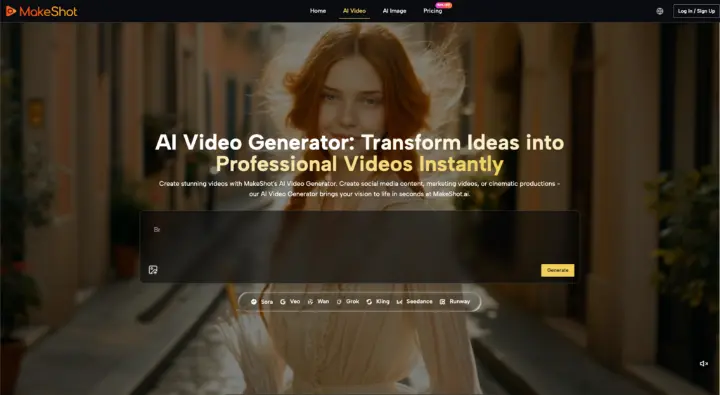
For a production team, this means the workflow must be model-agnostic. Using a platform like MakeShot allows a team to pivot between engines like Google Veo, Kling, or Runway without switching environments. This centralization is critical for operations. When all your assets, whether they are generated via Sora 2 or Seedance, live in the same project workspace, you reduce the "tool switching" tax that kills creative momentum.
This multi-model approach also provides a safety net. If a specific model update changes how it interprets "cinematic lighting," a team can quickly test the same prompt against a different engine to maintain the look of an ongoing campaign.
The Role of the AI Video Operator
The job description of a video editor is evolving into that of an AI Video Operator. This role isn't just about typing prompts; it's about curation and technical troubleshooting. An operator must understand why a specific AI Video Generator might be producing "jitter" in a background and how to mitigate that through prompt weighting or frame-rate adjustments.
Prompting as Technical Documentation
In a team setting, prompts cannot be haphazard. They must be treated as technical documentation. Standardized prompt structures—defining camera angle, lens type, lighting temperature, and motion intensity—ensure that different team members can produce semi-coherent results.
A common mistake is over-describing the scene, which often confuses the model's attention mechanism. Professional teams are finding that "negative prompting"—explicitly telling the AI Video Generator what not to include, such as "morphing," "low resolution," or "flicker"—is often more effective for quality control than elaborate descriptions of the subject.
The Post-Production Guardrail
No matter how advanced the AI Video Generator becomes, the "last mile" of production should almost always involve traditional post-production software. Generative clips are often used as raw ingredients. A 5-second clip generated by an AI might have the perfect lighting but an awkward ending. Instead of wasting credits trying to generate the "perfect" loop, editors are better off using AI-powered masking and frame interpolation in traditional NLEs (Non-Linear Editors) to fix the output.
Managing Stakeholder Expectations and Creative Limits
One of the hardest parts of operationalizing these tools is managing the expectations of clients or upper management. There is a prevailing myth that AI makes video production "instant." While it certainly accelerates the process, the time saved in "shooting" is often reallocated to "iterating."
We have to be honest about the uncertainty inherent in these systems. A prompt that worked perfectly yesterday might produce a slightly different result today due to server-side updates or stochastic variance. This lack of 100% reproducibility means that teams must build "buffer time" into their generative workflows. You aren't just generating one clip; you are generating ten and selecting the best one.
Furthermore, there is a distinct limitation regarding branding. AI Video Generator tools are currently poor at rendering specific, complex logos or text within a moving scene without warping. If your brand guidelines require a very specific, non-standard typeface to appear on a moving object, you will likely need to overlay that element in post-production rather than expecting the generator to handle it natively.
Cost-Benefit Analysis of Generative Assets
Operationalizing also means knowing when not to use AI. For high-trust content—like a founder's message or a detailed product demonstration—real video remains superior. The "uncanny valley" effect can still alienate audiences if used in the wrong context.
However, for top-of-funnel social content, background visuals for websites, or conceptual mood films, the cost-per-asset of an AI Video Generator is unbeatable. The goal for content teams is to identify the "low-risk, high-volume" areas of their production schedule where AI can take over, freeing up the human budget for the "high-risk, high-touch" projects.
Structuring the Feedback Loop
For a generative workflow to improve, the team needs a feedback loop that records what worked. Many teams are now keeping "prompt libraries" or "seed logs." If a specific seed in a specific model produced a perfect 35mm film look, that seed should be documented and shared across the team.
This level of rigor is what separates a hobbyist from a production house. By treating the AI Video Generator as a piece of high-end studio equipment—one that requires calibration and specific operating conditions—teams can finally achieve the consistency needed for professional-grade output.
Conclusion: The Path to Scale
The move toward generative video production is inevitable, but its success depends on the structures we build around the technology. By focusing on model diversity, standardized prompting, and a realistic understanding of current physical limitations, creative teams can use tools like MakeShot to scale their output without sacrificing their brand's visual integrity. The future of video isn't just about who has the best prompts; it's about who has the most disciplined workflow.
Rethinking Team Production Through AI Video Generator